
The Design Process of a Web Designer/Developer
Lorem ipsum dolor sit amet, consectetur adipiscing elit. Nunc ex sem, facilisis sed viverra nec, sagittis vel quam nulla nisi mi scelerisque quis.
Background
I went through Art School and got a degree in Graphic/Web Design. Through my degree process I was exposed to a bunch of really talented people, both teachers and students. Often they (more the teachers than the students) would discuss their process.
I’m not going to teach a whole design process class in one article, because there are books for that. However, I wanted to share the methods that I’ve been using for my projects, both personal and for clients. If you want to know more details about the Design Process, check this out.
Note:
I have learned the methods mentioned in this article by reading books, attending classes or having discussions with people. I will do my best to cite the resource as I go. However, like most things, I probably forgot where I heard it.
It’s been brought to my attention that the plan I am utilizing uses parts of Agile development. This isn’t a surprise, as one teacher, in particular, had us do several projects in this manner, I had just forgotten the name.
What to expect from this article
In this article I will be discussing the process for a project, from start to finish. I will use multiple examples throughout, but primarily this is geared towards building websites or web apps. I think it can be applied to any creative process though. Just take the chunks you need and carry on with your life.
This article is sort of a practical application of this article I wrote almost 2 years ago.
Timeline
- Get overview of project from client
- Make a proposal
- Build out Information Architecture
- Sketch layouts
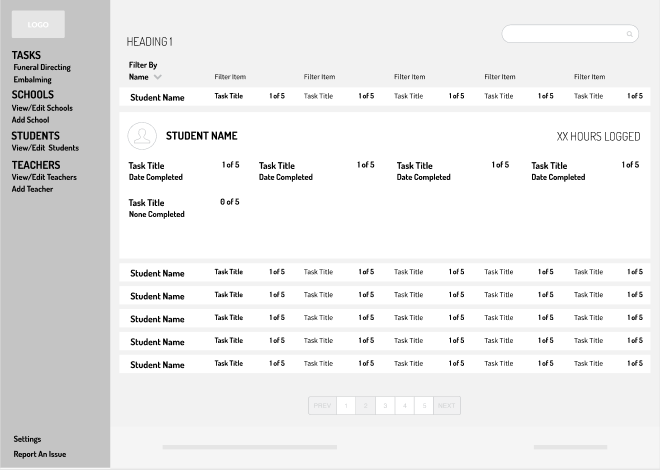
- Render sketches
- Create a Design Guide
- Make pretty Mockups
- Prototype
- Build the thing
- Test the thing
- Launch the thing
- Profit
Where Do I start?
The most exciting part of any project is the beginning when “anything is possible.” More often than not, the first conversation I have with a client is vague and non-technical. They want X, Y and maybe Z.
The Importance of Research
This will come up numerous times, as it doesn’t fit in a specific part of the timeline. Basically, try and learn everything you can about the subject you are going to be working on. For instance, when I worked on a card manufacturing website, I looked at their competitors to get an idea of what the customers were used to seeing.
The Proposal
What to charge?
Proposals are hard for new developers because it’s really difficult to figure out how long something is going to take. There are basically two options: charge by the hour or charge per feature. I’ve charged for both and don’t really prefer either. Charging hourly is great because you know you are getting paid your worth, but if you don’t know how long something is going to take, that might upset the client if you spend 50 hours on it when you said it would take 10. If you charge by feature, it could go the other way where you spend 50 hours doing something but the only charge for 10.
Frankly, it’s not easy to figure out how much to charge and that’s why no one has ever been able to give me a good answer. I will say, right now my freelance rate is $35/hr for front-end and $50/hr for the back-end. I dunno if that’s low or high, but it works for me. I ran across this graph before, and it’s helpful but complicated.
They accepted my proposal, now what?
Great! I know what they want, but now what? More research.
More Research
Take what you learned by researching the topic for the proposal and expand on it. If you are building a website, how exactly are you going to build it? What frameworks are you going to use? Where is it going to be hosted? Etc.
I would highly suggest creating a document; I usually call it the Information Architecture. In that document, you record everything you can about the project: frameworks, language choices, hosting options, costs, features, security stuff, etc. This will be really handy as you move along. Also, share this with the client! It does no good to design in a vacuum.

Sketching
Pencil Sketches
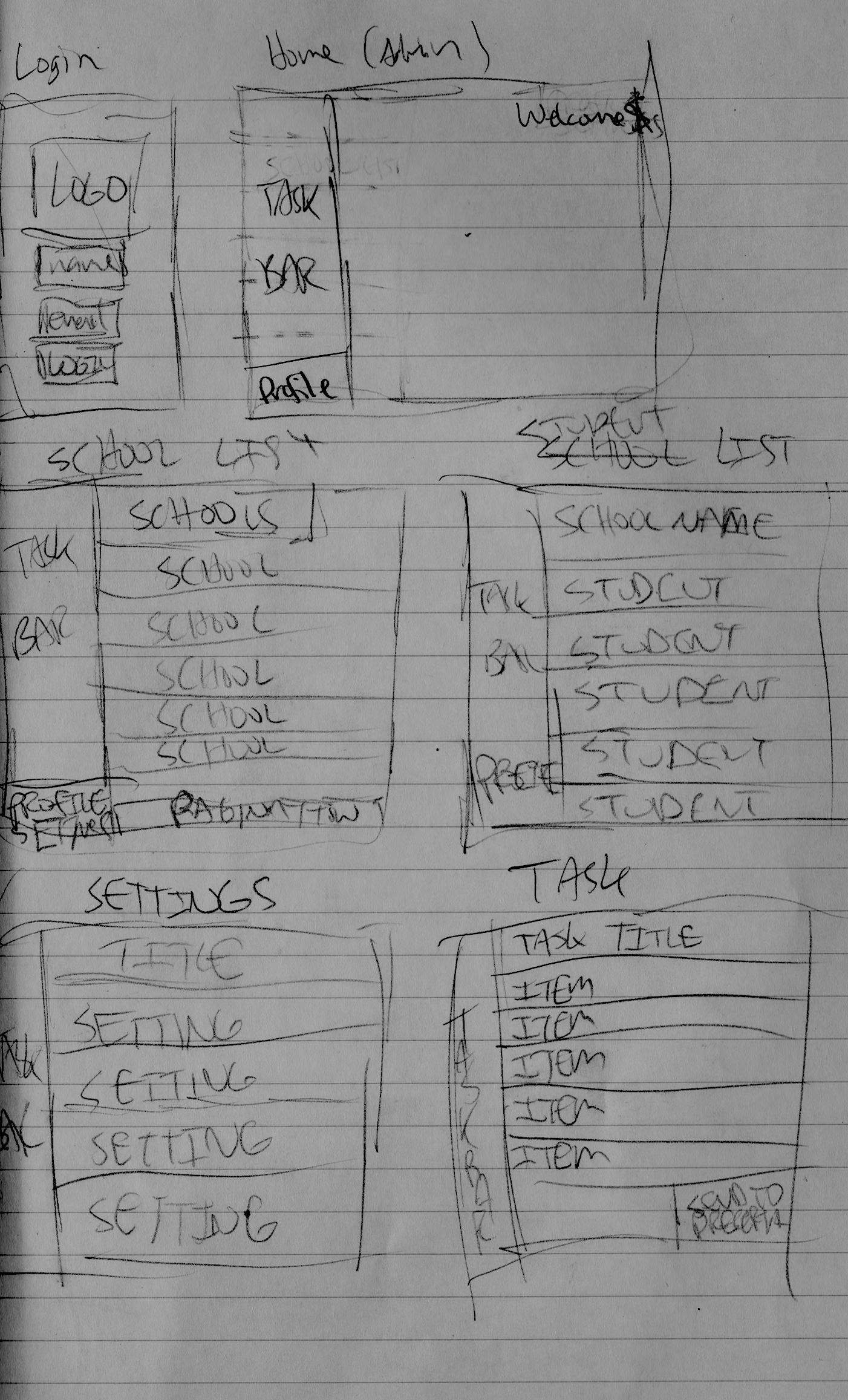
Rendered Sketches
The idea here is to abstract your design in a way that makes it easy to change without a ton of work. As you can see in the example below, I use stand-in data for everything. Generally, you want to limit the color scheme of this in black and white.
Design Guide
It’s a good idea to develop a design guide before moving into the mockups. For one thing, you need your client to sign off on the colors, fonts and general styles of the website before moving to the mockups. It doesn’t sound like a lot of work, but changing the font on all your mockups is a pain after you’ve mocked up 10 pages. Style Tiles is a pretty good resource to get started with that.
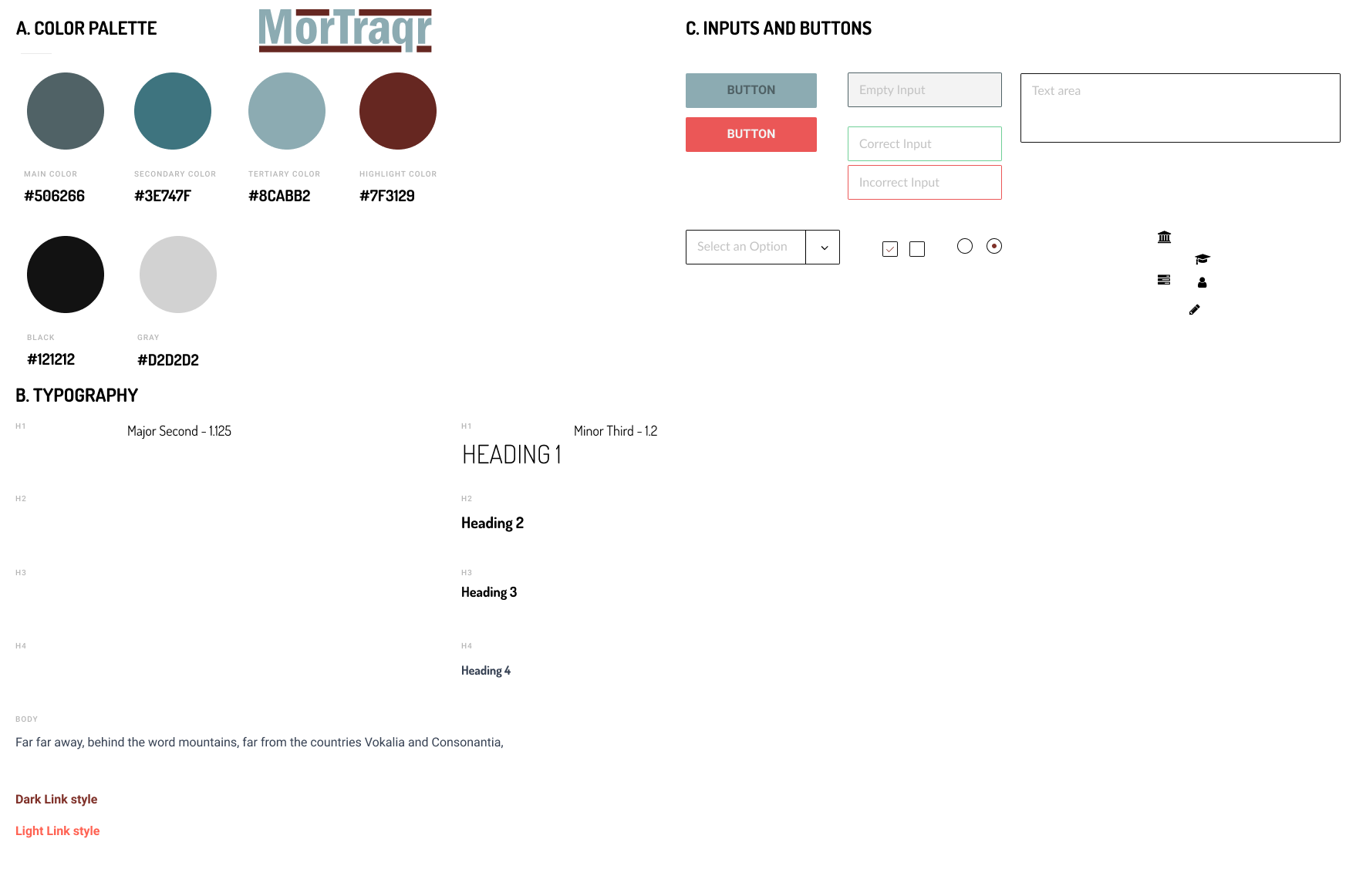
This isn’t the product I gave the client. I made it look pretty in Google Slides, but you get the idea.
Mockups
Cool, the client likes the colors and approved the rendered sketches. Let’s make some pretty mockups. Hopefully, if you did a good job with the rendered sketches, all you have to do here is replace the stand-in data with real data and add some color.
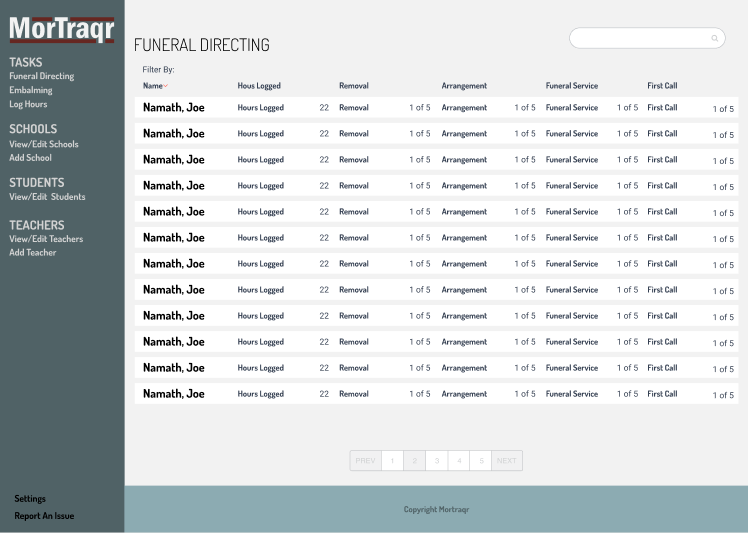
Note: Use real data as soon as possible! It’s sometimes difficult to wrangle content from a client because they often are still in the process of approving their content. However, as soon as you can put REAL information in your mockups, do it. It will solve a lot of problems before they begin, e.g. longer names, or content than expected.
Prototype
I have used three different programs to prototype with Marvel, Adobe XD, and Figma. None of them are superior to the other unless you account for cost. Figma is free.
I don’t think the tool matters when it comes to prototyping. I think what’s important is that you just do it. However, there are certain things to keep in mind when conducting a prototype.
- Have actionable goals for the user. Don’t just hand over a prototype and say, “play with it.” You want to test specific things. For instance, have a user login, log out or submit a new task.
- Write down the results. Adobe XD allows you to record the sessions, which comes in super handy later on down the road when you are testing user flow.
- Remember that prototyping is testing user experience and the user interface. It isn’t going to provide a means of testing functionality. Keep it simple.
For the prototype testing, you can create a “priming document” that spells out the details. Doesn’t have to be too advanced, just make sure the goals are clear.
Adjust Mockups
We learned some lessons, now adjust the mockups.
Prototype Again, if you want
I don’t think it’s necessary to prototype a second time, but if there are major changes to the UI, then I’d say do it again!
Build the thing
Holy crap, it’s been 1000 hours and we haven’t even built anything. Hopefully, since you have the completed, tested mockups in hand, it’s as simple as translating those ideas into code.
However, I’d avoid building out EVERYTHING in the first run. Build as many features as you need in order to test it with real people. At a minimum, build out the authentication system and at least one core feature of the thing before handing it over for testing.
Test the Thing
This part of the process is cyclical. You are going to build, test, build, test, in continuum until you finally reach version 1.0.
Bringing it back around from the prototype section, the same rules apply. Don’t just hand off the app to willing participants without clear instructions. Create a priming document that gives them things to do.
Note: Expect less than useful feedback included with very useful feedback. When it comes down to it, everyone thinks they are a designer. I had someone tell me that my headers should be bold instead of light. Take it with a grain of salt and use the stuff that matters. Remember: you’re building for the user, not for yourself.
You’re building for the user, not for yourself.
Deploy the thing
Small word of advice, don’t deploy if you plan on doing anything other than this project for a little while. There will be bugs, there will be issues. No matter how perfect your code, there will ALWAYS be cleanup.
Revel in your accomplishments
I think it’s important to take a step back after you finish a project and look at what you just made. A lot of hours went into the thing that is now accessible by anyone with an internet connection. Appreciate your worth for a minute.
Final Thoughts
As I mentioned earlier, I am new at this development game. I don’t claim to be an expert. I just thought it would be nice to compile my methods from all the experts I have listened to in the hope it would help someone else.
This process is a work in progress. I welcome all feedback.